Smart Assistant for Dolibarr — Technical Overview
Version: 1.0 · Date: 2026-08-05 · Publisher: Integmia
1. What This Document Covers
This document describes how the Smart Assistant Dolibarr module and the Smart Assistant hosted service work together: the components, the connection flow, the data flow, and the technical specifications. For the product description see Product Definition; for data handling see Data Privacy & Security.
2. Architecture
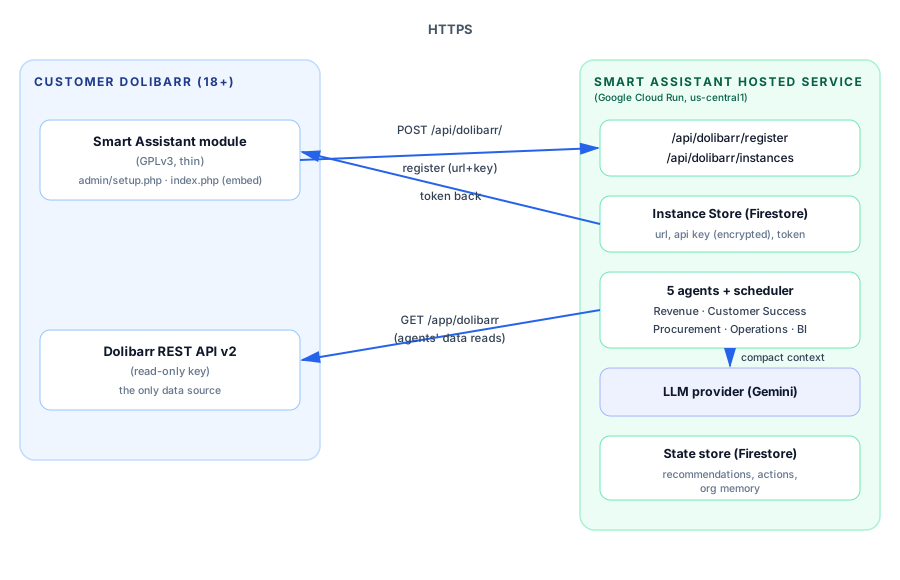
State store: recommendations, actions and org memory. Org memory holds only derived, non-sensitive operational context — never raw records, personal data, credentials, tokens or API keys.
Components
| Component | Where | Role |
|---|---|---|
Module (smartassistant/) |
Customer's Dolibarr (htdocs/custom/) |
Collects connection details, registers the instance, embeds the dashboard. Open source (GPLv3), contains no business logic. |
| Hosted service | Google Cloud Run (us-central1, EU/US data egress) | Runs the agents, scheduler, LLM analysis and serves the dashboard. |
| Dolibarr REST API v2 | Customer's Dolibarr | The only data source; accessed with a read-only API key. |
3. Connection Flow (Connect button)
- The admin opens Smart Assistant → Setup and enters:
- Hosted service URL (default
https://dolibarr.smartassistant.site) - Dolibarr URL (this instance)
- Dolibarr API key (read-only recommended)
- Hosted service URL (default
- The module calls
POST {hosted}/api/dolibarr/register(JSON, over HTTPS). - The service verifies the key by making one read call to the customer's Dolibarr API.
- On success the service issues a per-instance token (48 random hex chars) and stores the registration (URL, API key, versions, timestamps).
- The module stores the token in Dolibarr's
llx_consttable (SMARTASSISTANT_TOKEN). - The Setup page shows Connected.
Re-connecting rotates the token (old tokens stop working immediately).
Disconnecting removes the token from Dolibarr's llx_const; the module stops embedding
the dashboard. (Self-service deletion of the instance record on the service is planned;
until then, contact the publisher to remove it.)
4. Dashboard Flow
- The user opens Smart Assistant → Dashboard (
index.php). - The module builds an iframe URL:
{hosted}/app/dolibarr?token=...&user_id=...&lang=.... - The service validates the token, marks the instance as seen, and serves the dashboard HTML with the token injected (the dashboard's API calls authenticate with it).
- The dashboard reads agent state via the service's API: agent run status, open recommendations, pending actions, org memory.
- Each recommendation/action that targets a specific record carries a deep link to
that record in the customer's Dolibarr UI (invoice, order, customer, ticket, product…)
— the dashboard shows a View in Dolibarr button that opens the record in a new tab.
The service resolves the correct UI paths by probing the instance's web root once and
caching the result, so installs with non-standard layouts (e.g.
factureundercompta/) still link correctly.
Security note (planned): the instance token currently travels in the iframe URL. A short-lived session-token exchange is on the roadmap to eliminate token exposure in URLs/logs.
5. Agent & Data Flow
- The scheduler triggers agents (defaults: Revenue 6:00, Customer Success 7:00, Procurement 8:00, Operations every 30 min 6:00–20:00, BI Mondays 9:00 — all weekdays). Schedules are configurable server-side.
- Each agent reads the relevant business objects from the customer's Dolibarr REST API (customers, invoices, orders, products, tickets, suppliers…) using the stored read-only key.
- A compact summary of the relevant records is sent to the LLM provider (Gemini) for analysis (see Data Privacy & Security, §6).
- The agent normalizes the output into recommendations and suggested actions, stored in the service's state store.
- The dashboard presents them; actions require approval (human-in-the-loop) before execution.
6. Technical Specifications
| Spec | Detail |
|---|---|
| Module name / ID | Smart Assistant / 194000 (range 194000–194019 claimed) |
| Dolibarr compatibility | 18+ (tested against 23.x) |
| PHP | 7.0+ (8 recommended) |
| Module license | GPLv3 or later |
| Module size | ~38 KB (7 files + docs) |
| Hosted service | Node.js (Express) on Google Cloud Run (us-central1), 256 MiB |
| Hosted URL | https://dolibarr.smartassistant.site |
| Auth (service) | Per-instance bearer token (X-SA-Token); register endpoint rate-limited |
| Dolibarr access | REST API v2 (/api/index.php/...), read-only key, DOLAPIKEY header |
| LLM provider | Google Gemini (gemini-2.5-flash), key stored in Google Secret Manager |
| State storage | Instance registrations: Firestore (durable across redeploys; API key encrypted at rest with AES-256-GCM). Agent state (recommendations, actions, org memory): service-local store (regenerated by re-running agents) |
| Transport | TLS 1.2+ everywhere |
| Logging | Rotating access logs (request ID per request; no payloads/tokens logged) |
7. Deployment & Operations
- The hosted service is deployed from the engine repository
(
github.com/mkeshmirian/dolibarr-operations-platform, private) viagcloud builds submit+gcloud run deploy; secrets (LLM key, Dolibarr API key) are stored in Google Secret Manager. min-instances=1keeps the service warm so registered instances stay responsive.- Instance registrations are stored in Firestore, so connections survive service redeploys and scale-to-zero. Agent state (recommendations, actions, org memory) is service-local and regenerated by re-running agents; the customer's Dolibarr API key is encrypted at rest (AES-256-GCM, key in Secret Manager).
© 2026 Integmia — Smart Assistant for Dolibarr